An AI assistant can change a lot of files before the application is ready to run again. A feature might need a backend change, a regenerated client, and a frontend update before the pieces work together.
That became a practical problem while building Taproot. Automatically rebuilding as those files changed meant repeatedly trying to run unfinished work. The environment was busy reacting to edits while the assistant was still making them.
We use Docker and Tilt to run Taproot locally, but we’ve deliberately made rebuilding a separate step. The assistant can finish a change, check it, and then update the running application.
That choice is a useful example of how our development environment has evolved around working with AI.
We need to run more than a website
Taproot has an editor and administration interface, a backend API, and services that generate published sites and process images. Those services also need a database and somewhere to store files.
A feature can involve several of those pieces. Uploading an image, for example, involves more than getting a file picker to appear in the browser. We need to see whether the upload, processing, and resulting image work together.
We chose to run those services locally so we could exercise that behavior during development. It gives us somewhere to investigate a problem and try a change before moving it toward production.
It also gives an AI assistant a defined environment to work with. The repository describes how the services are built and connected, so a fresh session has somewhere to find those answers.
Docker packages the services; Tilt coordinates the work
Docker lets us package services with the software they need to run. We use Docker Compose for supporting services such as PostgreSQL, our database, and Mailpit, where we can inspect development emails. Our application services run in local Kubernetes through Docker Desktop.
There are enough pieces here that starting and updating them individually would become a job of its own.
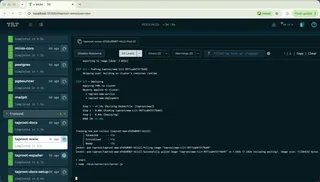
Tilt brings them into one development workflow. Its configuration describes the builds and the resources they belong to. It also gives us a common place to see service status and logs.
For Taproot, that coordination is why Tilt earns its place. We can update the relevant part of the application through an established process instead of reconstructing a set of commands each time.
The setup lives alongside the code. When the application gains a dependency or its build changes, we can review the environment change with the feature that needs it.
Why we control when rebuilding happens
Tilt normally watches files and updates affected resources automatically. That is convenient when you want each edit reflected in the running application immediately.
Our AI workflow produces a different pattern of edits. An assistant might change a contract, update its implementation, and then regenerate the client. Between those steps, the source tree can be temporarily inconsistent.
Our earlier automatic rebuilds thrashed the local cluster with those intermediate states. We switched to Tilt’s manual update control: it still notices changes, but waits for an explicit trigger before applying them.
Now we can leave the running application alone while a change is taking shape. Once the work is ready, we rebuild the affected services and wait for them to settle.
There is a responsibility that comes with this. Saving a file does not update the running app. Before checking a feature in the browser, we have to rebuild it. Otherwise, we may be inspecting yesterday’s behavior while looking at today’s source code.
Give the assistant a repeatable process
We have a repository command that handles rebuilding through Tilt. It checks the environment, triggers the relevant resources, and reports failures. It also accounts for cases where one build produces files that make another resource need updating.
The details belong in the tooling. During normal work, the assistant needs a reliable way to request an update and find out whether it completed.
That helps keep the workflow understandable:
The assistant changes the code and runs the relevant checks. When the change set is ready, it updates the local environment. We can then exercise the feature with its services running together.
We also keep responsibility for the shared environment clear when several agents are working. Separate worktrees let them make code changes independently, while one owner coordinates what reaches the running local stack. Otherwise, one assistant could rebuild the application while another is halfway through checking it.
This fits with our move to a monorepo. The monorepo lets us change related code together; the local environment lets us run the resulting system together.
Local development should exercise the awkward parts
We want the local setup to include behavior that matters to the product.
For example, we use HTTPS locally because secure cookies and browser APIs depend on it. We have local file storage and a place to inspect emails. Those are ordinary parts of using Taproot, so they need to participate in development too.
This helps us investigate features beyond the point where a component renders or an API method returns successfully. A publishing feature needs somewhere to publish. An image feature needs storage and processing.
The environment still differs from production. Local services have different capacity, and some infrastructure has local substitutes. Some compilation and code generation also happen on the host machine. Containers make parts of the environment more consistent; they don’t remove every machine dependency or replace testing.
The setup takes maintenance
Docker Desktop and local Kubernetes consume machine resources. Images take time to build, and the environment configuration needs attention as the application changes.
We’ve also had to be careful about which files trigger updates. Watching generated output can create a loop where a build changes a file that makes the same resource need rebuilding again. Test output and caches can cause unnecessary work too.
Those are costs of this approach. We maintain the build inputs and the coordination code because they support the way Taproot is developed.
For a smaller application, Docker Compose and a few documented commands may be enough. Tilt becomes more useful as coordinating the pieces starts consuming time you wanted to spend on the product.
Why this fits the way we build
AI assistants can help us make changes across Taproot, but those changes still need to become working software. A predictable local environment gives us somewhere to bring the pieces together and examine the result.
Docker gives us a consistent way to run services. Tilt coordinates their builds and updates. Choosing when to rebuild lets us finish a coherent change before asking the environment to run it.
We’ve put effort into that process because we use it throughout development. The next feature has an existing place to run, an established way to update it, and logs to investigate when something goes wrong.
For another part of that workflow, read how we generate Taproot’s clients from a shared contract. It follows one API operation from its definition to the browser code that calls it.